

The rules of Google advertising have quietly changed, and what worked two years ago might be quietly costing you today.
Google Pay-Per-Click advertising remains one of the most powerful tools a small business can use to reach new customers. But "set it and forget it" has never been less viable than it is right now. Between sweeping AI changes, new ad formats, stricter policy enforcement, and rising competition, 2026 is demanding a fundamentally different approach to PPC than what most business owners learned even two years ago.
Whether you're just getting started or trying to figure out why your once-solid campaigns have gone flat, this guide covers what you need to know.
What's Changed: The AI Takeover of Google Ads
If you haven't revisited your campaigns lately, you may not realize how dramatically the platform has shifted. Google has spent the past two years moving from AI as an optional enhancement to AI as the engine of the entire system.
The most visible sign of this: Performance Max and AI Max campaigns have become the new standard. (Though we prefer Performance Max...) Instead of manually building keyword lists and ad groups, advertisers now supply assets (headlines, descriptions, images, videos) and Google's AI assembles and delivers combinations based on what it predicts will work best for each individual user and context.
The shift sounds convenient, and in some ways it is. *But* it also means advertisers who aren't feeding the system high-quality, diverse inputs are ceding control without realizing it. The quality and variety of your creative assets now directly determine how well the AI can optimize for you.
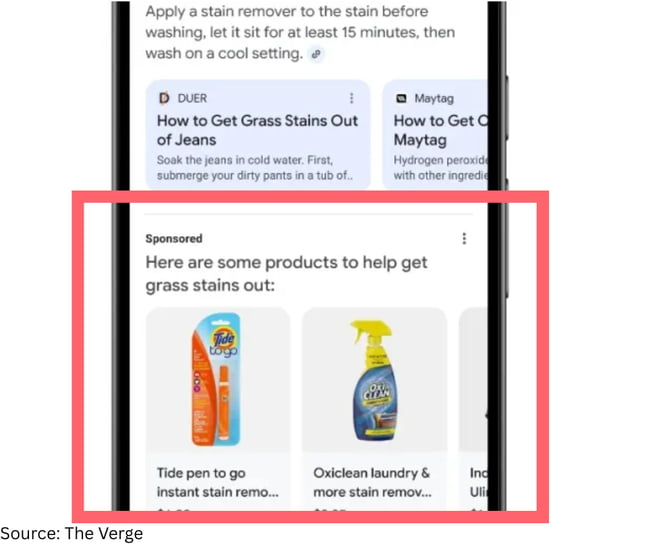
Another major change: ads in AI Overviews. Google expanded this placement from mobile-only to desktop and global markets throughout 2025. When a user searches and Google generates an AI summary at the top of results, your ads can now appear inside that experience...but if your ad isn't selected for it, you may be pushed further down the page than ever before, which drives up the competition (and cost) for traditional ad placements.
The Policy Enforcement Reality Check
Google's 2025 Ads Safety Report revealed something striking: the company blocked 8.3 billion ads, which is up from 5.1 billion the year prior. At the same time, it suspended far fewer advertiser accounts, because it's now taking a more surgical approach. Rather than banning advertisers wholesale, Google's AI systems (powered by its Gemini models) are flagging and blocking individual ads at the creative level with much greater precision. Over 99% of policy-violating ads were caught before they ever appeared to a user.
What this means for you as a small business owner: policy compliance is no longer a once-and-done check. Google introduced 35 policy updates in 2025 alone. The areas drawing the most enforcement attention include misrepresentation, financial services ads, copyright issues, and ad network abuse. If your ads are in any of these categories, staying current with Google's policy documentation isn't optional.
For most small businesses, the bigger practical risk isn't intentional violations. It's outdated ad formats. Google has been systematically retiring legacy formats (form ads, standard text ads, old responsive formats) and replacing them with asset-based, AI-assembled formats. If you're still running campaigns built around old structures, it's worth a full audit.
Why Your Ads Might Be "Stuck"
Performance plateaus are one of the most frustrating experiences in PPC. Your ads were working, then they just...stopped improving. Here are the most common reasons this happens:
The algorithm hasn't learned enough. Google's Smart Bidding strategies need data to work. The algorithm functions best with a minimum of around $50–100/day in budget and at least 30–50 monthly conversions to learn from. If your budget is below this threshold or you're getting very few conversions, the system is essentially guessing. Google recommends running campaigns for a minimum of six weeks before drawing major conclusions.
Your creative assets have gone stale. AI-assembled campaigns rotate through the assets you provide. If you uploaded the same five headlines two years ago and haven't touched them since, the system has nothing new to test. Regularly adding fresh headlines, descriptions, and images gives the algorithm more to work with.
Auto-applied recommendations are running unchecked. Google's automated recommendations can adjust bid targets, add keywords, and modify ad copy, all without explicit approval if you've enabled them. Many advertisers have found these changes improve Google's metrics while quietly increasing costs or misaligning campaigns with business goals. Review your recommendations settings and audit any changes that have been applied automatically.
You're not using negative keywords strategically. Without them, your budget gets eaten by irrelevant traffic. This is especially common with broad match keywords, which have become the default as Google pushes advertisers toward less restrictive matching.
Your landing page isn't pulling its weight. Google's Quality Score (which directly affects what you pay per click and how often your ads show) is heavily influenced by landing page experience. After the December 2025 core update, Google's Helpful Content classifiers now feed directly into landing page scoring. A slow, generic, or thin landing page hurts your ad performance even if the ad copy itself is excellent.

Practical Ways to Improve Performance Right Now
Audit your asset quality. For any campaign using Responsive Search Ads or Performance Max, look at Google's asset performance ratings (Low / Good / Best). Replace "Low" rated headlines and descriptions with fresh, specific copy. Aim for 11–15 unique headlines, with at least one short option under 15 characters.
Feed the algorithm with first-party data. Audience signals have become the fuel of modern campaigns. Upload your customer lists (Google reduced the minimum for Customer Match from 1,000 to just 100 users, making this accessible to smaller businesses), connect your CRM, and make sure conversion tracking is set up accurately. The more context you give Google about who your best customers are, the better it can find more of them.
Add remarketing to your strategy. Ads targeting people who have already visited your site can increase conversion rates dramatically. Studies have shown improvements of over 100% compared to cold audiences. If you're not running any remarketing, you're leaving the warmest part of your audience unaddressed.
Use geo-targeting deliberately. Local targeting consistently produces higher click-through rates than broad national campaigns for most small businesses. If your service area is regional, tighten your targeting to match....and write ad copy that speaks directly to that geography.
Review search term reports regularly. Even in an AI-driven world, search term data tells you what people are actually typing when your ads show. This is where you'll find irrelevant traffic to exclude and new keyword opportunities you didn't think to target.
Test your landing pages. A compelling ad that sends users to a slow, confusing, or generic page is wasted spend. Your landing page should directly match the intent of the ad...same offer, same language, clear single call-to-action.
Thinking About Budget: What's Actually Enough?
One of the most common questions small business owners ask is how much to spend. The honest answer: it depends on your industry, goals, and market, but there are useful guardrails.
The average cost-per-click across Google search ads is around $2.69, but this varies enormously by industry. Legal and financial services routinely see much higher CPCs due to intense competition. Home services, consumer electronics, and SaaS all have their own benchmarks.
Here's a practical framework:
- If you're just starting out, consider a test budget of $1,000–$2,000 per month. This gives Google's AI enough signal to begin learning without committing to a scale that doesn't yet have data behind it.
- If your goal is to run Smart Bidding effectively, you need enough budget to generate 30+ conversions per month. Do the math: if your conversion rate is 3% and your average CPC is $3, you need roughly 1,000 clicks (or about $3,000/month) to hit that threshold.
- If your budget is below the learning threshold, don't abandon campaigns, but be realistic. Manual bidding strategies may outperform Smart Bidding when conversion volume is very low. You can also consider focusing on fewer, tighter campaign structures to concentrate conversions.
Budgeting isn't just about total spend. It's about making sure your spending is high enough in the places that matter. Spreading a small budget across ten campaigns often performs worse than concentrating it on two or three well-structured ones.

The Bottom Line for Small Business Owners in 2026
Google Ads in 2026 rewards businesses that treat the platform as a system requiring regular attention, not a vending machine where you insert budget and collect leads. The AI-driven changes of the last two years have made campaigns more powerful for advertisers who engage with them, and more opaque for those who don't.
The small businesses winning with PPC right now are doing a few things consistently: keeping creative assets fresh, using real customer data to build better audiences, maintaining tight control over where their budget goes, and staying current as the platform evolves.
If it's been a while since you've done a real audit of your campaigns, that's the place to start. The landscape has changed enough that what you find might surprise you.
Bonafide helps small businesses cut through the noise and build marketing strategies that actually work. Have questions about your Google Ads setup? Let's chat.